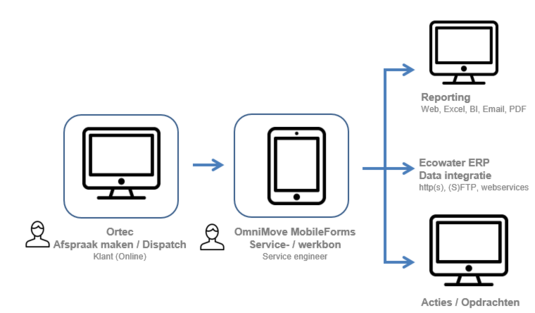
Ortec
Customers can schedule their appointments online 24/7. Prior to the appointment, they automatically receive timely notifications, reducing the risk of forgotten appointments or the customer not being home.
Tasks are assigned to technicians based on optimized route planning.
OmniMove MobileForms
Tasks are automatically sent to the correct service engineer in the right order. The engineer opens the task, and any known data is already pre-filled. The engineer completes the form with working hours, materials used, inspections, photos, payment details, and obtains the customer’s digital signature for approval.
Reporting
The customer automatically receives an email with the service report or work order in Ecowater’s custom layout.
If needed, Ecowater can retrieve the service report via the OmniMove portal.
Statistics and the exact location where the report was filled out are also accessible.
ERP Integration
Via the OmniMove API/DataSource connector, the ERP system of Ecowater is automatically updated, enabling immediate invoicing of the service report or work order.
Follow-Up Actions / Tasks
Follow-up actions, such as creating a quote, can be triggered directly from the service report. These are forwarded to the relevant person by email or web form.
Additional Applications
In addition to service reports and work orders, Ortec is also used to schedule maintenance contracts, quote requests, and installation reports. Other forms, such as tool orders or vehicle damage reports, are handled within OmniMove.
More Information
Would you like more information about this solution? Please contact us.